CHANGE IT NEXT MONTH
Come back in March and move the arrow.
Save the capture and every mark stays a separate object: drag it, retype it, resize it, delete it. No starting again because one label was wrong.
See how it works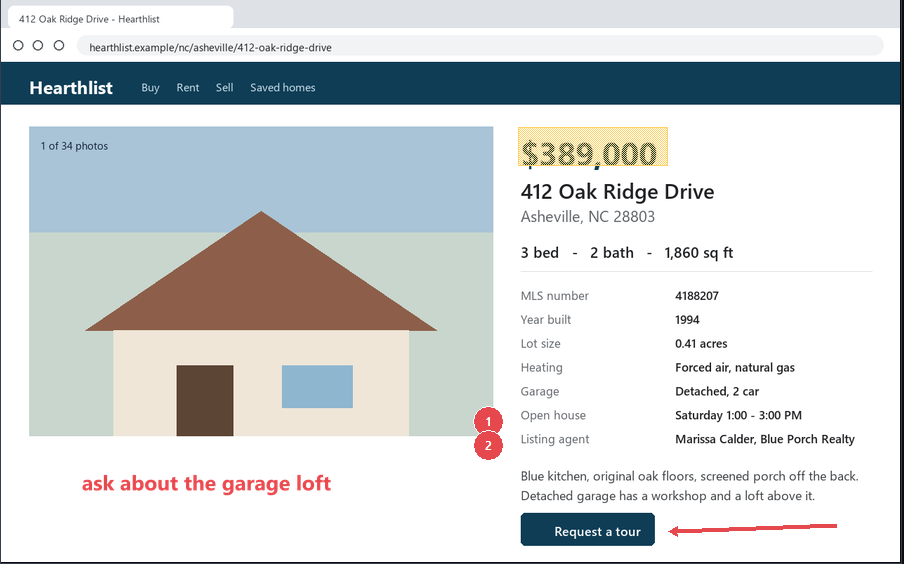
Press Print Screen and click a window, or drag around just the part you need. It lands on your clipboard, saved with the date and time, and you can find it months later by typing a word that was in it. Mark it up, record your screen, copy the text out. A screenshot tool for Windows you buy once and keep.
No account. No cloud. Nothing uploads unless you send it.
$389,000
412 Oak Ridge Drive
Asheville, NC 28803
3 bed · 2 bath · 1,860 sq ft
Open house Saturday, 1–3
One press. Five things happen.
 ready to paste

1,400 captures. Type “oak ridge”. There it is.
No card for the trial. Windows 10 and 11. $39 once — what it costs
01Why not the free one?
Snipping Tool is free, already on your PC, and it reads text and records the screen. For a quick snip it is fine. What you buy CopyThat for:
And nothing to opt out of: Windows’ built-in tools route images through cloud AI features you have to opt out of. CopyThat has no cloud.
02The one nobody else leads withfound by a word inside it
Six weeks of house hunting, eleven listings captured, and the one with the blue kitchen is somewhere in a folder of Screenshot 2026-08-14 211703.png. In CopyThat you type blue kitchen.
Every capture is read the moment you take it, and the words inside the picture become the search. Not the file name, not a tag.
See how it works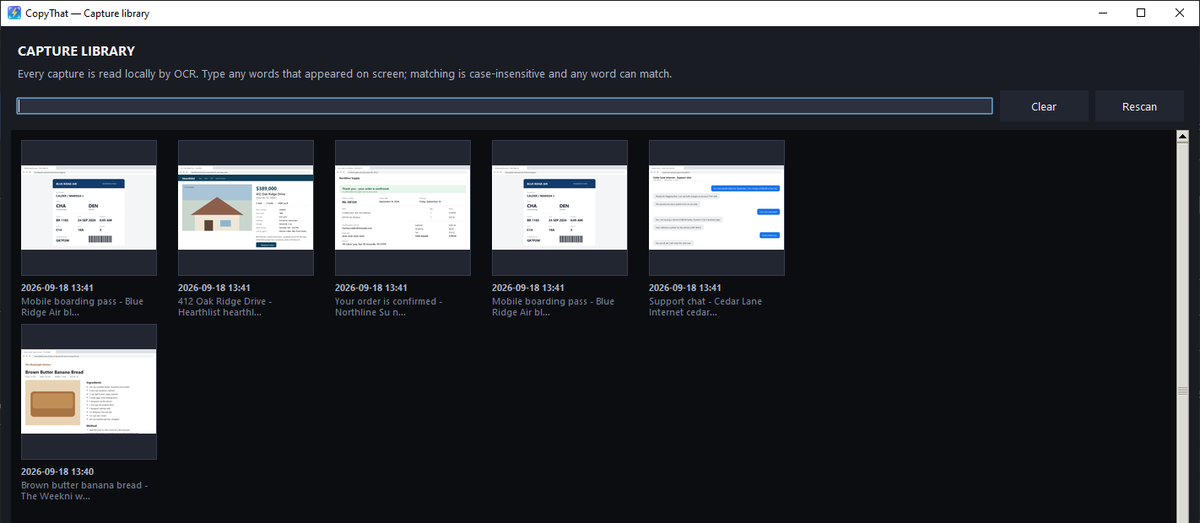

03What it does for youone job per row
Save the capture and every mark stays a separate object: drag it, retype it, resize it, delete it. No starting again because one label was wrong.
See how it works
A PDF that will not let you select? Press Ctrl+Alt+PrintScreen, drag over the words, and they land on your clipboard as text you can paste. Read on your PC, never on a server.
See how it works! No text selection
Order 41-2208 shipped 9/11. Balance due on receipt: $4,182.00 net 30.
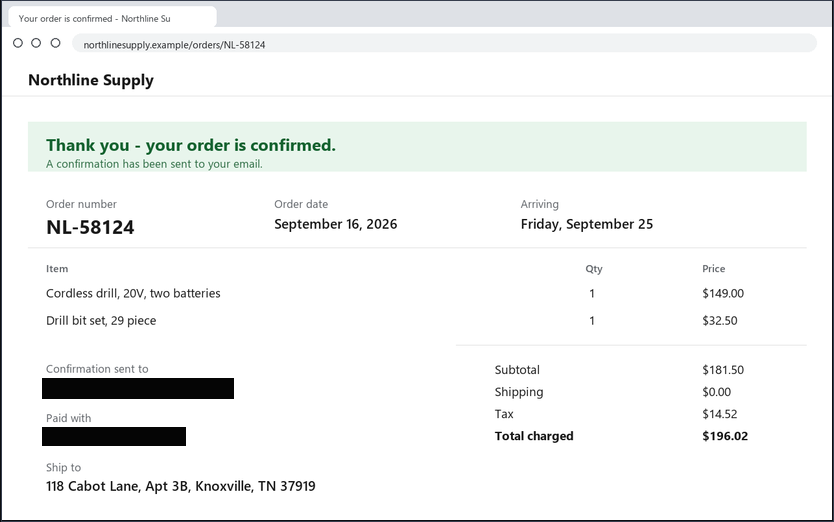
Redact is an opaque box, not a blur someone can undo, and it flattens into the picture when you export. Find sensitive text finds emails and card-number-like digits so you can redact before sharing.

Numbered steps count themselves, so seven captures become one instruction sheet. Approval stamps carry your name and today’s date, baked into the proof at placement. No other capture tool ships that out of the box.
See how it worksRecord the screen with your microphone, your computer’s sound (a Zoom or Teams call, say), or both, and add a voiceover afterwards. CopyThat reminds you that recording a call may need everyone’s permission. Video → GIF… turns a clip into something you can paste.
Press the key, drag the box, press Ctrl+V in the chat. The picture is already on the clipboard: no save dialog, no file name, no attach button in between.
See how it worksOne key, one paste, and it reads your window instead of guessing which one you have.
One window. Not a roadmap — this is the download today, named as the app names it.
Seventeen tools, one key each.
Seven global hotkeys, all reassignable.
OCR, recording and the library — all local.
Nothing leaves this PC unless you export it.
Free with your license.
Every font on the PC, each row drawn in its own typeface.
04What it sends, and to whomPRIVATE — stays on this PC
Help › Check for updates automatically turns it off.
%LOCALAPPDATA%\CopyThat\logs.
One license, one person. The full privacy policy says the same in more words.
05The priceone payment, yours forever
CopyThat
$39once. The app is yours forever.
For anyone who takes screenshots: capture, mark up, find it again by the words in it, record your screen, PDFthat included.
Your first year of updates is included. Updates are optional after your first year: $10 a year per license if you add them when you buy, $20 a year if you add them later. Skip them and the version you have keeps working forever.
Bonus: Free PDFthat program ($25 value) so you can let that Acrobat subscription go bye-bye.
CopyThat Decorator
$49once. The app is yours forever.
Everything in CopyThat, plus the promo-products tools: logo clean-up and vectorization, graphic design and manipulation tools for most promo product proofs, an embroidery file simulator, approval stamps, quote and presentation tools with a profitability calculator, and more. Watch it work →
Your first year of updates is included. Updates are optional after your first year: $10 a year per license if you add them when you buy, $20 a year if you add them later. Skip them and the version you have keeps working forever.
Bonus: Free PDFthat program ($25 value) so you can let that Acrobat subscription go bye-bye.
We ship updates weekly. Over the coming year we plan to further enhance the image and vector tools, so you can do more of your work inside one program instead of many. Your copy keeps working forever.
Founding testers pay $35 — apply for a spot →
Also planned: a way to bring in your favorite suppliers’ products for fast mock-ups.
Try every feature free for 15 days first, so purchases are final. Something wrong? Email us and a person sorts it out.
| Three years of each | CopyThat | Snagit Individual |
|---|---|---|
| Year 1 | $39 | $39 |
| Year 2 | $0 or $10 | $39 |
| Year 3 | $0 or $10 | $39 |
| Stop paying | Keeps working | Won’t open |
Snagit Individual: $39 a year; a lapsed subscription stops the app (techsmith.com, checked October 7, 2026). Snagit is a trademark of TechSmith Corporation.
Buying for a team? Seat discounts for 4 or more. Email support@copythatnow.com with how many.
Compared with Snagit
| CopyThat | Snagit | |
|---|---|---|
| Price | $39 once | $39 a year (US), subscription only since 2025 |
| Keeps working if you stop paying | Yes, forever | No: access ends when the subscription ends |
| Cloud account required | No. The key is checked on your PC | Yes: a TechSmith account; internet at activation and every 90 days |
| One key and the picture is on the clipboard, saved too | Yes | Capture, then choose where it goes |
| Capture modes | Region, window, full screen, scrolling, timed, fixed size | Region, window, full screen, scrolling, timed, fixed size |
| Copy the text out of any picture (OCR) | Yes, read on your PC | Yes |
| Screen recording | Yes: microphone and computer sound, then GIF | Yes, and stronger: a video editor that trims and combines clips |
| Webcam in recordings | No | Yes |
| Approval stamps with your name and today’s date at placement | Seven, built in | Stamp images from its asset library |
| Mac version | No, Windows 10 and 11 | Yes, Windows and Mac in one license |
| PDF editor included | PDFthat, free | No |
Snagit facts from techsmith.com and support.techsmith.com, checked October 7, 2026. Snagit is a trademark of TechSmith Corporation.
Who’s behind this
Thirty-five years running my own business, then a year next to an AI — typing paragraphs about a window open in front of me. Both problems had the same shape: the picture should already be on the clipboard.
If you take screenshots every week and ever need one again, yes. It is $39 once, what Snagit charges for one year. Try the whole app for 15 days with no card first.
On Windows 11, Print Screen opens Snipping Tool by default. CopyThat asks which key you want and can switch Windows’ shortcut off for you; Capture settings gives it back, and so does uninstalling. To do it by hand: Settings › Accessibility › Keyboard, then turn off “Use the Print screen key to open screen capture”.
Nothing you already bought changes. Your key never expires and the version you have keeps working forever. If you are on the update plan, we email you before every renewal charge and you can cancel any time; cancelling never breaks the app.
No. $39 once for the app. Updates after your first year are optional; skip them and the version you have keeps working forever.
Yes. The full app for 15 days, no card, no account. When it ends nothing is deleted and nothing uninstalls; saving waits for a key.
How it starts
Type your address and the signed installer link lands in your inbox. On day 16 the app keeps working; saving waits for a key.
One email with the link, no autoresponder. We may follow up about your trial; we never sell or share your details (privacy). support@copythatnow.com.
Sent. Check your inbox. Or download it right now.
Nothing in a couple of minutes? Look in spam.
Using AVG or Avast? It may warn about the installer while it runs. That is a false alarm on a brand-new release, and we have reported it to Avast. If it asks, choose Allow.