For distributors, suppliers, decorators & sign shops
Run circles around your competition for $49.
The first mock-up in wins the order.
I’m a supplier, 35 years in this business. We were paying over $150 a month per person for design, screen-capture, digitizing and quoting software, so we built our own. We use it hundreds of times a day, and industry friends started asking for a copy. Now it’s yours, bought once.
- From their JPEG to your mock-up in minutes. Caps, tees, totes, mugs… anything you put a logo on.
- Open the DST and answer the phone. Stitch count, threads, sew-out.
- Quotes with your profit built in. Plus approval stamps and PDFthat.
- One of the best screen-capture tools on the market. Find any capture later by a word in it.

“I put logos on shirts, caps, mugs and signs.”
$49 onceCopyThat Decorator.
A decorator puts logos on things. If you fix a customer’s artwork, send a proof and quote the job, that is you.
Choose CopyThat Decorator — $49the page you are on
Both editions are the same download. The key decides which rooms open.
CopyThat is also on the Microsoft Store. CopyThat Decorator is sold only here, at copythatnow.com/decorator. Already have CopyThat from the Store? Your Decorator key unlocks it: Help › Activate.
From the person who built it
Why I built CopyThat Decorator.
I’m David, founder of The Cap Company. This year we invested heavily in a graphics engine for designing caps, and we think it’s one of the best in the business. Then it hit us: if we put that engine into the software we use every day, it could help the whole industry. So we did, and we priced it so anyone can say yes.
There’s no venture capital and no giant software company here. Just people who’ve been in this business for thirty-five years, as a distributor and now as a supplier, who built something we needed and decided to share it.
Real jobs, recorded on screen
Watch it done, start to finish.
Watch a trucker cap layout built in about four and a half minutes 1:59
The customer’s logo arrives on a white box: Remove background, recolor it, shape it to the front of the cap, add a flag on the side and the order details, then save it as a project you can still edit next week.
Watch a T-shirt mock-up made and emailed before the customer’s meeting 2:09
A blank shirt, Remove background, the customer’s logo placed and resized, then saved and sent by email.
Watch a rate card become a one-page customer quote 2:57
Set up your rate card once, decorate a garment in Quote Studio with the customer’s embroidered logo, then save and email a one-page quote.
Watch a customer’s stitch file become a polo proof 1:49
Open the DST, check its size and stitch count, match the threads to the Madeira chart, copy the thread sheet, and place the logo on the shirt. No embroidery program, Photoshop, Corel or Illustrator.
Watch a logo put on a tote bag 1:12
Place the customer’s logo on a blank tote, size it, and the mock-up is ready to send.
Watch a tote decorated and quoted 2:07
The same tote, then Quick Quote prices the job from your rate card and shows your profit.
How to put a logo on a mug 1:19
Add the logo, Remove background, then arch it so it wraps around the mug. Save it or email it to the customer.
Three weeks later
They changed their mind on a proof you already marked up.
PROOF — Northside Apparel Co · 144 caps
One file, one revision further along. The proof you send Friday is the job you opened in August.
Screenshot pending — this frame is drawn, and it is here to hold the place. Replace it with a real capture: CopyThat with northside-144.copythat reopened from File › Open project…, the Select tool lit on the rail, the Front callout selected with its four handles showing, the Inspector reading the callout’s own font and size, and a REVISED PROOF stamp carrying today’s date on the canvas. 1600×846, dark theme, a licensed build so the trial banner is out of frame. Delete this note with the drawing.
0proofs rebuilt from scratch
Open the job. Move the callout. Re-stamp it. Send it.
Art moved to the left chest, stitch count came down, and the approval on file is three weeks stale. In a flat PNG that is a rebuild: re-capture the garment, re-draw the arrow, re-type the note, re-stamp, hope it looks like the one you sent last time.
It is not a rebuild here. Save project… keeps the annotated job whole — every arrow, callout, number, spotlight and stamp stays an object with its own colour, width, font and size. Reopen it next week or next quarter, click the callout, drag it where the decoration actually went, retype the count, take the old stamp off and put today’s on. Undo walks back through the crops and the canvas edits too, not just the last line you drew.
The saved job draws its own thumbnail in Explorer, so the proof from last month is the one you can see in the folder before you open anything.
In the app: Save project… Open project… — the shop’s own .copythat files · Select · V · Undo Ctrl+Z · Stamp · K.
The rest of the day
One key, and it is already saved, already read, already on the clipboard.
A supplier’s stock page, the digitizer’s reply, the tracking screen, the art the customer pasted into a chat window. You are not filing any of it. You are pressing one key and carrying on.
1
Press the key. Drag the box.
Region, active window, full screen across every monitor, an exact pixel frame, the same rectangle as last time, or a page taller than the screen. Seven hotkeys, all reassignable, claimed exclusively so CopyThat wins the keystroke.
2
It files itself and reads itself.
A PNG lands in your folder with the date and the time already in the name, and the words inside the picture are read here on your PC — which is what makes the library findable in November by a word nobody typed.
3
Then Ctrl+V
Into the mail to the customer, the ticket, the supplier’s portal, the thread with the digitizer. No Save As, no folder dialog, no going back to look for the thing you took eleven seconds ago.


Six months later
The PO. The invoice. The sew-out you approved.
Confirmation A7Q‑5512
Invoice 2214 · 13 September 2026
288 caps, two-location embroidery
Card ending 4242 · $1,248.00
The purchase order, the invoice, the sew-out approval, the art the customer pasted into chat — every one of them arrived as a screen. One key saved it. CopyThat reads the words inside the picture, so you find it later by typing one of them.
1,400 captures. Type “invoice”. There it is.
The afternoon
The four rooms nobody else puts in one window.
A customer’s logo arrives as a JPEG in an email. By lunch it is real vector art, on the garment, priced and stamped. Same program, same key, nothing else open.
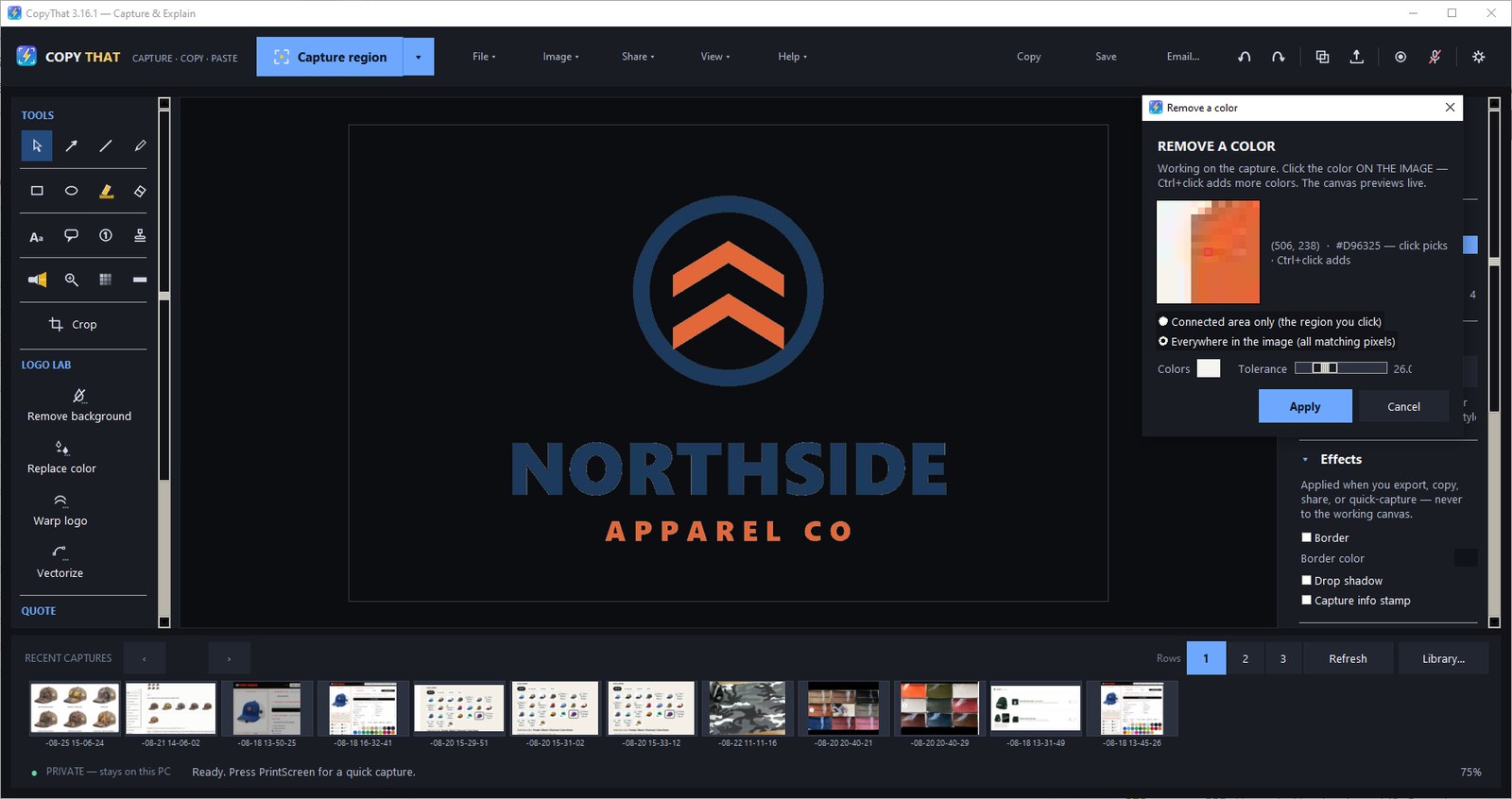
0outsourced art jobs
Clean the artwork without opening Photoshop.
Click the colour on the image and the background goes — Ctrl+click adds more, because a “white” background is usually three near-whites. A tolerance slider, a zoom loupe following the cursor, and the canvas previews live. Then bend the mark onto a curved product: arch and condense are how a logo sits on a cap.
In the app: Remove background… Replace color… Warp logo… — Arch, Skew, Perspective, Condense, Width %, Height %.
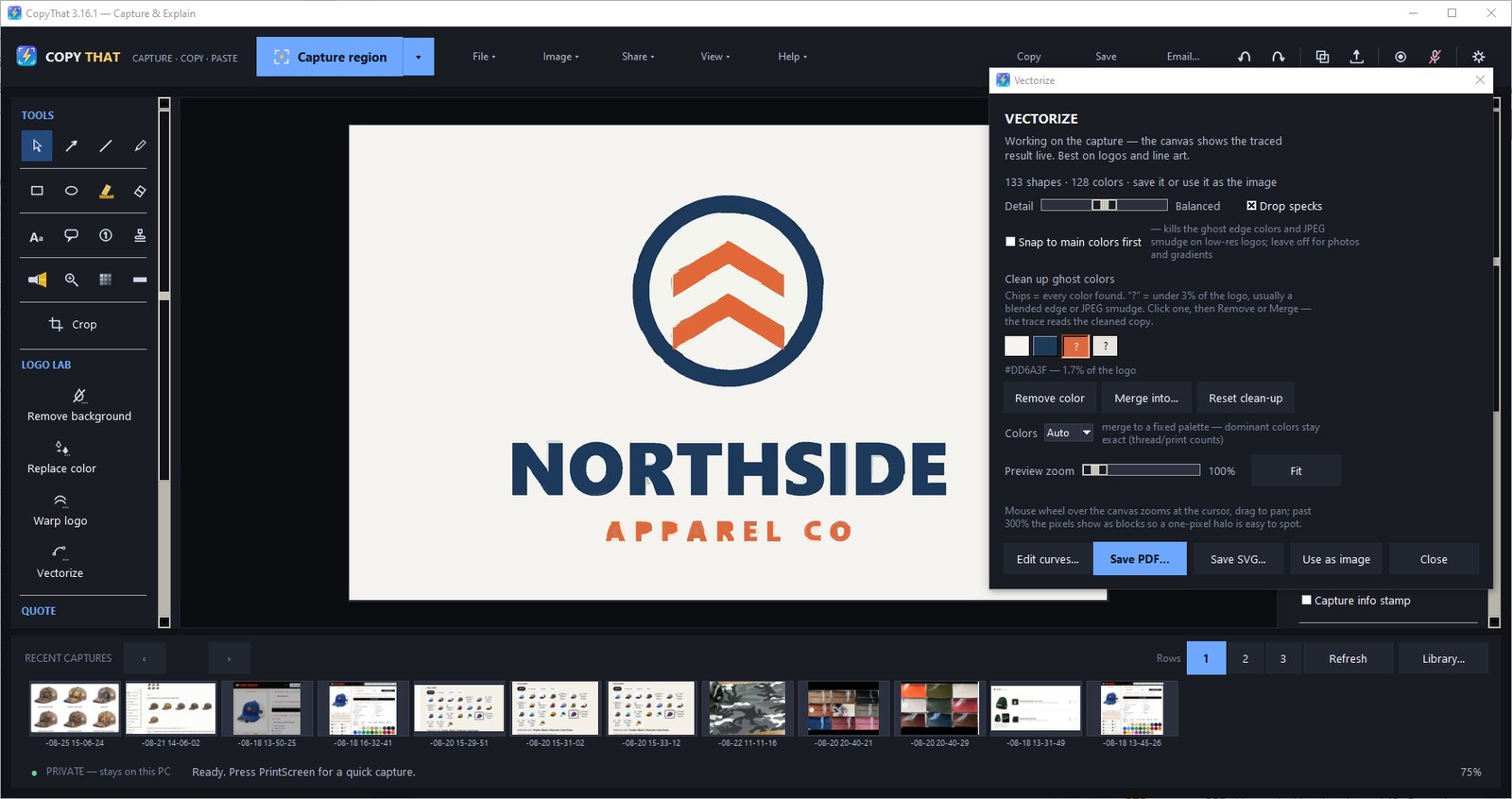
0trips to the vector house for a decent JPEG
A customer’s JPEG becomes real paths, here, in a minute.
The trace runs live on the canvas. Every colour the trace found becomes a chip: click a stray one and Remove it, or Merge it into the brand blue, until the count is exactly the colours they will print. Snap to main colors first kills the ghost edges and the JPEG smudge on a low-resolution logo. Save an SVG or a true-vector PDF — or send the paths to the Curve Editor and drag the nodes. One honest limit: a tiny, blurry file is beyond any trace, ours or anyone’s. Send those to the vector house. Vectorize is for the decent JPEG that just isn’t a vector.
The logos you stop sending out pay for the program. Then they keep paying, one job at a time.
In the app: Vectorize… with Detail and Drop specks, the clean-up chips, and Curve Editor (localhost only, nothing uploaded).
7stamps, with your name and the date baked in
The proof goes back signed.
Pick the stamp, type your name once, click the proof. It lands reading APPROVED BY <name> — <today’s date>, tilted, baked into the image at placement — no other capture tool ships that out of the box. Try it:
Before you forward it
Take the card line off first.

2kinds of sensitive text it points at for you
The screen you are about to forward has someone’s details on it.
Supplier confirmations, a customer’s PO, the paperwork that comes back with a card on it — the useful part is one line and the part that should never leave the building is the line above it. Find sensitive text finds emails and card-number-like digits so you can redact before sharing, instead of trusting your own eyes at 4:55 on a Friday.
Redact is an opaque mask, not a blur that comes apart when somebody leans on it. The boxes stay reviewable while you are still working, and Export or Flatten is what makes them permanent — so you can check them before, and never after.
In the app: Find sensitive text · Redact · X · Pixelate · B · Flatten · Export effects apply to the exported copy only.
And the whole list of what it says to the internet.
- Buying from a supplier? Your customers stay yours. Your art, quotes and customer files stay on your PC. Nothing reaches us — not The Cap Company, not anyone.
- Nothing you capture leaves this PC. The trace, the text recognition, the sewout, the library search and every quote run here. There is no cloud, no account and no analytics, nothing about what you capture, open or click is sent, and nothing you make is uploaded anywhere: the one sharing path that could ever send a file needs an HTTPS endpoint you type in yourself, and it asks you to confirm every single upload.
- The key is checked on your own machine. It carries its own proof, so there is no activation server and nothing to phone home to. Nothing can lock you out, because there is nothing to fail.
- One request, and you can switch it off. Once a day, and whenever you check by hand, CopyThat checks for updates. It sends its version number, which edition it is and how it was installed, a random install code, and a licence code we can match only to the order it was sold under, so we can see if one licence is being shared across many computers. It never sends your email, your licence key, or anything you capture. Help › Check for updates automatically turns it off.
- The installer is code-signed, so Windows knows exactly where it came from — and so does whoever in your building decides what gets installed.
- A folder of files, not a service. No drivers, no background service, no scheduled task, no browser extension. Installed per user, or portable from a zip with no uninstaller at all.
- Crash logs stay on your disk. They are written to
%LOCALAPPDATA%\CopyThat\logsand are never transmitted.
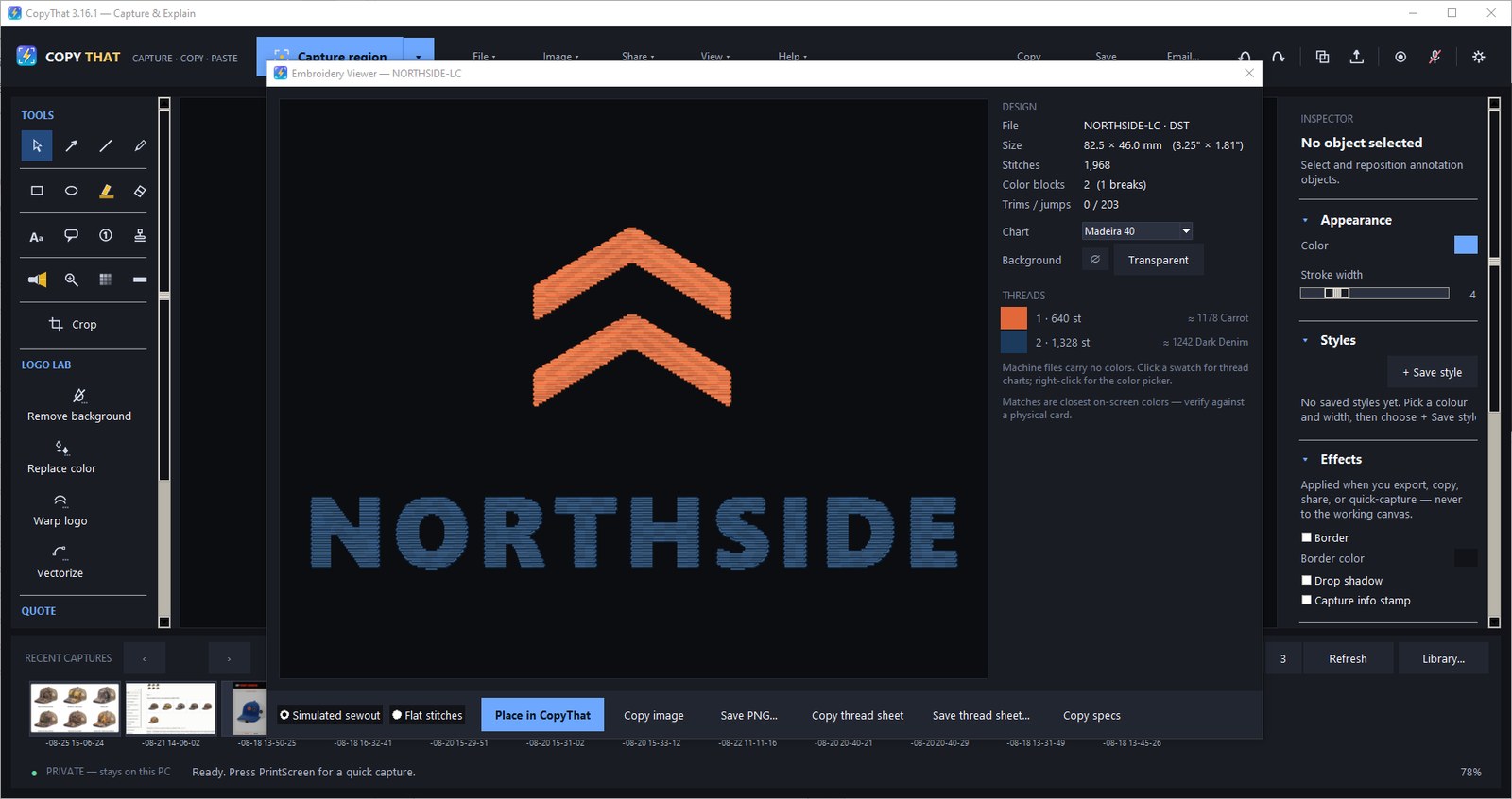
7 formatsDST, EMB, PES, EXP, JEF, VP3, XXX
Open the DST and answer the phone.
Drop in the customer’s stitch file and the numbers are on screen before the distributor finishes the question: size, stitch count, colour changes, trims and jumps. Pick a thread for each colour from the charts your shop already orders from. Then look at the sewout on the shirt colour they asked for; change the colour and it redraws. It is drawn from the stitches in the file, so the same file looks the same every time.
In the app: Open embroidery file… (DST, EMB, PES, EXP, JEF, VP3, XXX) → Embroidery Viewer; threads from PMS coated, Madeira 40, Isacord 40, Robison-Anton 40; the thread sheet exports with a legend.
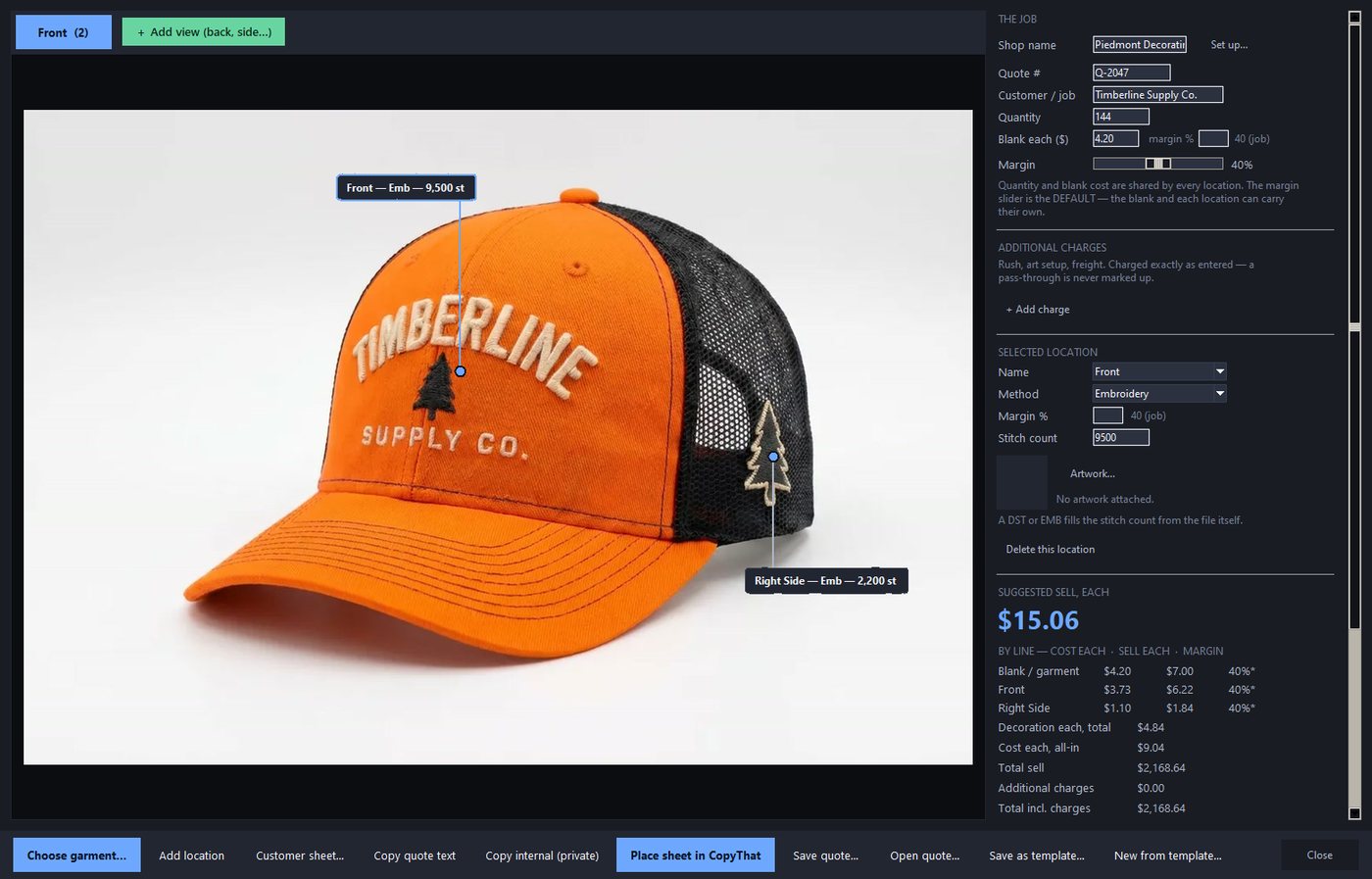
Up to 6views on one job, each decoration pinned where it goes
Price the job on the picture of the job.
Drop the garment photo in, add a view per side, and pin each decoration where it actually goes. Set method and spec per location — drop a DST and the stitch count fills itself — then watch cost, sell, margin per line and total profit move on every keystroke. Rush, art setup and freight are pass-through: charged exactly as entered, never marked up.
In the app: Quote Studio · Quick Quote · Rate cards… (Embroidery, Screen print, Heat transfer vinyl, DTF / DTG print, Laser engraving, Patches).
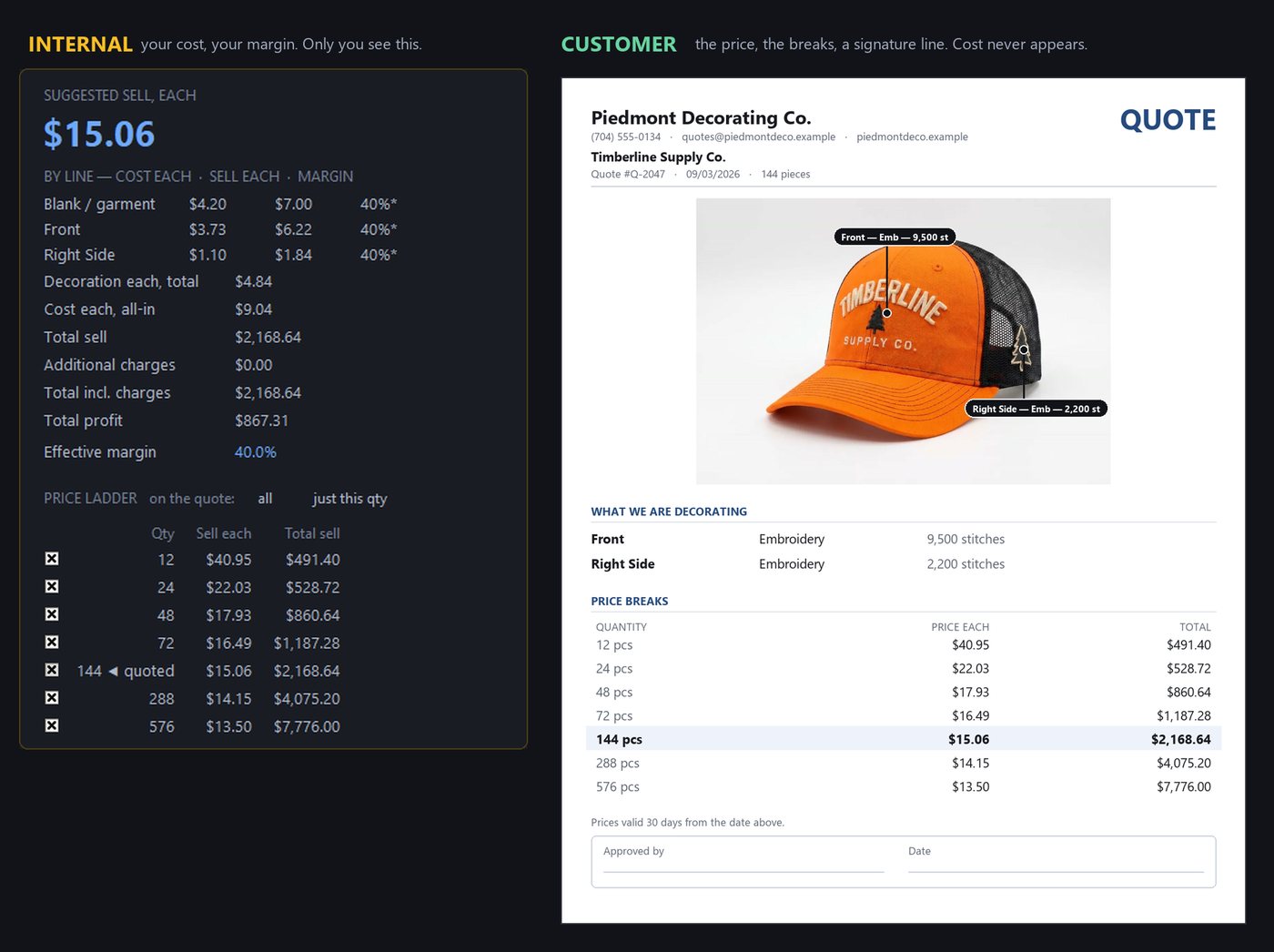
0ways for cost to reach the customer sheet
Your numbers stay on your side of the desk.
Same job, two documents. The internal panel carries blank cost, decoration cost per location, sell each, margin per line, total profit and the price ladder. The customer sheet is built from sell prices only — cost and margin are structurally absent from it, not hidden on it. Save the shape of a job and the next one takes a minute; templates carry geometry and placeholders, never rate cards, customers or your shop name.
In the app: the INTERNAL QUOTE SHEET and the customer sheet · Save canvas as template… / New from template… / .ctquote.
2 programsone key, one download
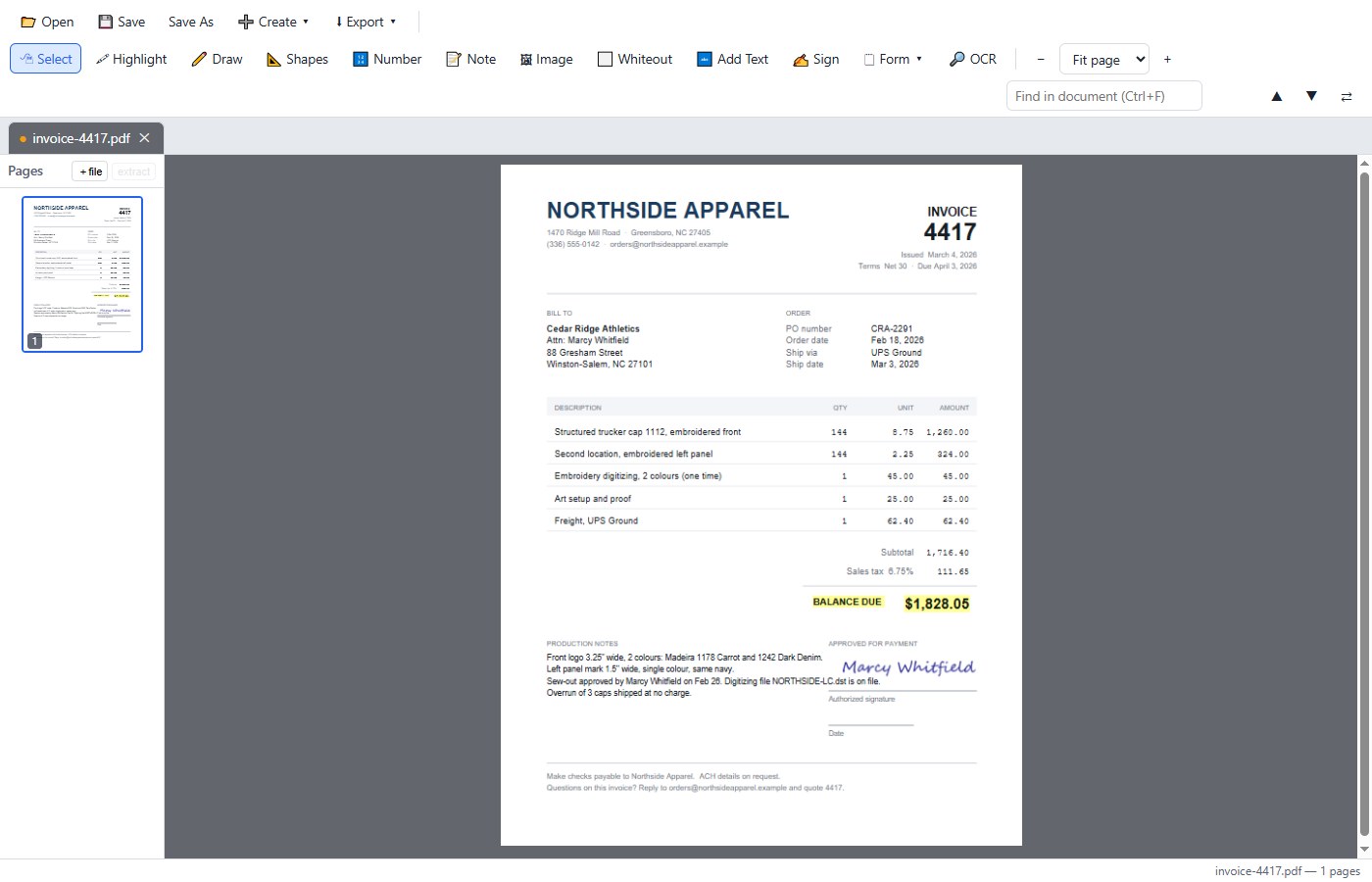
There is a second application in the box: PDFthat.
PDFthat is a second signed installer behind the same link, and it is a program in its own right — read, mark up, sign, OCR, combine, build fillable forms, so you can let that Acrobat subscription go bye-bye. Fully local, offline, its own window. Choose it as your PDF opener once, the way Windows asks, and a double-click opens it here — Save writes back to that file.
What it will not do: reflow-edit body text (use Whiteout and Add Text), or PDF → Word. Signing is a visual stamp, not a certificate signature.
Everything in CopyThat is in here too.
One key and the picture is on your clipboard and saved. Drag over a locked PDF and the words land as text. Record the machine doing the thing. Mark it up with seventeen tools on single-key shortcuts. Find the capture from three weeks ago by a word that was inside it. Same binary — the key decides which rooms open.
Get it off the screenIncluded13
- Capture region — one key, drag a box, and it is on the clipboard and saved
Quick region → Clipboard - Region into the editor — the same drag, opens marked-up-ready
Region → EditorCtrl+PrintScreen - Region straight to a file — a PNG lands in your share folder
Region → File - Full screen — the whole desktop, every monitor
Full screen - Active window — just the window you are looking at
Active window - Fixed-size capture — an exact pixel frame follows the mouse; presets 1200×628, 1920×1080, 800×600
Fixed size… - Repeat last region — the same rectangle again, no re-dragging
Repeat last regionCtrl+Shift+F7 - Scrolling capture — taller than the screen; it scrolls and stitches
Scroll pageCtrl+Shift+F9 - Timed capture — a countdown so you can open the menu you want to photograph
Delay ▸ 3 / 5 / 10 seconds - Screen recording, mic optional
Record screenMic audioCtrl+Shift+F8 - Video to GIF — MP4/MOV/MKV/AVI/WEBM, two-pass palette
Video → GIF… - Recent captures strip — a paged thumbnail tray, 1–3 rows
Recent captures rows ▸ - All seven hotkeys reassignable, claimed exclusively so CopyThat wins
Capture settings…
Text off the screenIncluded4
- OCR any region — the words land on the clipboard as text
Grab text (OCR)Region → Text (OCR) - OCR the open image — every word out of the capture you are holding
Extract text (OCR) - Sensitive-text finder — finds emails and card-number-like digits so you can redact before sharing
Find sensitive text - Searchable library — the OCR’d text inside a capture is the index
Library…
The TOOLS railIncluded21
- Select · V — every mark stays an object you can move later
- Arrow · A — drag from the explanation toward the target; drag a round bend handle to curve it
- Line · N — a plain connector, same bend handle
- Pen · P — freehand ink; hold and move to write
- Rectangle · R and Ellipse · O — outline or filled, own fill colour, 0–100%
Fill opacity - Highlight · H — emphasise without hiding; five marker presets plus a custom chip
- Eraser · E — erases live as you drag. Size,
Strength,Edge, Round/Square,Erase to: Clear / White / Color / Restore original, Stop at color edges, and Area erase - Text · T — type onto the canvas at the size it keeps; click old text to edit it
- Every font on the PC — each row drawn in its own typeface; hover to preview live; Recent / Recommended / All fonts
- Letter outline & Align — an outline that scales with the words; Left / Center / Right
- Callout · L — a speech box with a tail you drag onto what it explains
- Numbered step · S — markers number themselves 1, 2, 3
- Spotlight · G — one area bright, everything else dimmed; several stay clear together
- Magnify · M — a draggable enlarged inset with a resizable source
- Pixelate · B — the slider sets the block size
- Redact · X — an opaque mask, not a blur you can undo
- Crop · C — keep the area you drag
- Stamp · K — approval stamps with your name and today’s date baked into the proof at placement
- One slider, one honest label per tool — Pixel size, Zoom amount, Ink width, Line width, Stroke width
- Quick styles — a colour and width you keep re-picking, up to 10 chips
Styles+ Save style - Inspector
AppearanceStylesEffectsCanvasKeyboard
Canvas, projects, templatesIncluded10
- New canvas… — a white canvas in its own tab, with size presets
- Open image… and Add image…
- Paste as new canvas
Ctrl+V - Paste onto this canvas
Ctrl+Alt+V - Flatten, Canvas size…, Fit canvas, Reset edits…
- Editable projects — save the whole annotated job, change it next week
Save project…Open project… - Canvas templates —
{customer}and{date}in the text become questions the next opening asksSave canvas as template…New from template… - Explorer thumbnails — a saved project draws its own canvas as the file’s picture in the folder, so last month’s proof is the one you can see before you open it
.copythat - My business… — company name, logo, contact line and approval signature in one dialog
- View
Fit to windowZoom 100%Zoom 400%Show tool labelsLarger text
Get it outIncluded6
- Copy to clipboard
Ctrl+C - Export…
Ctrl+S - Email… — a real pre-attached compose window via MAPI for desktop clients; webmail paths ride the clipboard, one Ctrl+V in the message
Email setup… - Save for email (opens folder)… — a flattened PNG in a folder, opened for you
- Engrave export (SVG)… — the canvas as a real-millimetre SVG; the dialog asks one number: how wide the engraving is on the part
- Export effects — applied to the exported copy only, never the working canvas
BorderDrop shadowCapture info stamp
Logo LabUnlocked by your key7
- Remove background… — click the colour on the image, Ctrl+click adds more, tolerance slider, live preview with a zoom loupe
Remove color… - Replace color… — live picking, and the shading survives the swap
- Warp logo…
ArchSkewPerspectiveCondenseWidth %Height % - Vectorize… — live on the canvas; save SVG, a true-vector PDF, or keep the raster
- Detail preset & Drop specks — inside Vectorize
- Palette clean-up chips — Remove or Merge any source colour before the trace;
Snap to main colors firstkills ghost edges and JPEG smudge - Curve Editor — node-level path editing in your browser on localhost only (ports 4632–4635); “Send back to CopyThat” returns the SVG, a transparent PNG and a true-vector PDF
EmbroideryUnlocked by your key6
- Open embroidery file… — DST, EMB, PES, EXP, JEF, VP3, XXX
- Embroidery Viewer — size, stitch count, colour breaks, trims and jumps, already read
- Threads
PMS coatedMadeira 40Isacord 40Robison-Anton 40; click a colour in the sewout to identify it - Sewout simulation — deterministic arithmetic, never a model call; drop it onto a product photo as a normal layer
- Wilcom TrueView recolour — for .EMB, re-tinted per thread with luminance preserved, so it reads as re-threaded, not painted
- Thread sheet — the sewout plus a legend naming every thread the way a shop orders it
The Decorator’s ToolboxUnlocked by your key6
- Quote Studio — pin the decorations on the garment and watch the money; a view per side (Front, Back, Left, Right, Detail), up to six
- Internal panel vs customer sheet — blank cost, decoration cost per location, sell each, margin per line, total profit, the price ladder; the customer sheet is built from sell prices only
- Quick Quote — type what the job is; the money moves on every keystroke
- Rate cards…
EmbroideryScreen printHeat transfer vinylDTF / DTG printLaser engravingPatches - Job templates — locations, methods, stitch counts; geometry and placeholders only, never rate cards or customers
.ctquote - Pass-through charges — rush, art setup, freight; flat or per piece, up to 12, charged exactly as entered and never marked up
PDFthatIncluded6
- Read and mark up — continuous scroll, zoom, search, selection, then
🖍 Highlight✏️ Draw📐 Shapes🔢 Number📝 Note🖼 Imageas real page content - Change the page —
⬜ Whiteout,🔤 Add Text(auto-matches the original font and size, stays re-editable), find & replaceCtrl+Fthen⇄, 12-step undo - Sign and fill —
✍️ Signdraw, type or upload, saved for reuse and flattened into the page; fill native form fields; build fields with🗒 Form ▾ - Offline OCR — writes an invisible text layer, so scans become searchable
🔎 OCR - Create and export — combine PDFs and images, Images/Word/Text → PDF
➕ Create ▾; pages → PNG at 72/150/300 dpi, .txt, flattened or rasterized copies⬇ Export ▾ - Thumbnail rail — drag to reorder, rotate, delete, extract, insert from another PDF
HousekeepingIncluded8
- Help
Keyboard shortcuts…Activate…Legal & licenses…About CopyThat - Request a feature… — a “tell us what you wish it did” box that opens your mail client pre-filled. No account, no form
- Guides ▸ — illustrated walkthroughs that ship beside the app
Getting startedQuote StudioEmbroidery Viewer - In-app updater — downloads the signed installer, refuses it unless the SHA-256 matches, runs it silently over the top and relaunches; key, captures and settings untouched
Check for updates… - Check for updates automatically — on by default, and a checkbox that switches it off
- Single instance and tray — launching again brings the window forward; close-to-tray with tray capture actions
- Install kinds — installed (per-user), portable (zip, no uninstaller), source
- Error logs stay put — crashes write to
%LOCALAPPDATA%\CopyThat\logsand are never transmitted
The difference, in ten seconds.
Same download, same trial, same key system. This is the whole of what changes.
| What you get | CopyThat“I capture screens and talk to an AI” | CopyThat Decorator“I put logos on things” |
|---|---|---|
| Capture, OCR, recording, GIF, the editor, the library | Everything | Everything |
| PDFthat — mark up, sign, OCR, combine, build forms | Included | Included |
| Approval stamps, your name and today’s date baked in at placement | Yes | Yes |
| Logo Lab — background, colour, warp, vectorize, curves | — | Yes |
| Embroidery Viewer — specs, threads, sewout, sheet | — | Yes |
| Decorator’s Toolbox — Quote Studio, Quick Quote, rates | — | Yes |
| Price | On the CopyThat page | $49 once One-time purchase. |
The price
One price. Nothing hidden.
CopyThat Decorator is the whole program: capture, OCR, video, the editor and PDFthat, plus Logo Lab, Vectorize, the Embroidery Viewer and the Decorator’s Toolbox. Twelve months of updates included.
The easiest yes you’ll make this year. $49, once. Not a month. Try every tool free for 15 days first.
One person, the machines you use
CopyThat Decorator
$49once. The app is yours forever.
Have a creator’s code? 20% off.
- Everything in CopyThat, plus Logo Lab and Vectorize
- The Embroidery Viewer and the Decorator’s Toolbox
- PDFthat included. One license, one person, on up to three computers.
For Windows 10 and 11 only. Not available for Mac.
We ship updates weekly. Over the coming year we plan to further enhance the image and vector tools, so you can do more of your work inside one program instead of many. Your copy keeps working forever.
The everyday capture app
CopyThat
$39once. The app is yours forever.
Have a creator’s code? CopyThat is $20 with one.
- One-key screenshots, mark-up, approval stamps, search by the words in them
- Screen and audio recording
- PDFthat included
Not included: Logo Lab (background removal, recolouring, vectorizing), the Embroidery Viewer, and the Decorator’s Toolbox (Quote Studio, Quick Quote, rate cards).
For Windows 10 and 11 only. Not available for Mac.
Also planned. A way to bring in your favorite suppliers’ products for fast mock-ups.
Not sure? Both are free to try for 15 days — every feature unlocked while you try.
Buying for a team? Seat discounts for 4 or more. Email support@copythatnow.com with how many.
- $49 is the price, charged today — never a struck-through number nobody paid.
- Twelve months of updates are included. Updates are optional after your first year: $10 a year per license if you add them when you buy, $20 a year if you add them later. Skipping them changes nothing you already have: the version you own keeps working forever.
- Snagit is a good screenshot tool. We’ll say it first. It is $39 a year and stops when you stop paying. Decorator is bought once and never expires.
- Started on the capture side? Email us with your key and pay the difference. Same program, new key, nothing to reinstall.
- Try every tool free for 15 days, no card. Bought it? 15-day money-back guarantee, no questions asked. The installer is code-signed, so Windows knows exactly where it came from. Something wrong? Email support@copythatnow.com and a person will sort it out.
Snagit is a trademark of TechSmith Corporation. Snagit price checked October 7, 2026.
Who’s behind this
Thirty-five years of doing it the hard way.
I sell decorated products. I have paid the vector house, waited on the digitizer, quoted a cap from a spreadsheet and re-typed a stitch count off a screen. CopyThat Decorator is the afternoon I wanted back. One person, not a committee.
The short answers.
Is this a subscription?
No. One payment for the app. Your first year of updates is included. Updates are optional after your first year: $10 a year per license if you add them when you buy, $20 a year if you add them later. Skip them and the version you have keeps working forever.
Does the artwork leave my PC?
No. The trace, the OCR, the sewout, the library search and the Curve Editor all run here — the Curve Editor opens in your browser on localhost only. Once a day, and whenever you check by hand, CopyThat checks for updates. It sends its version number, which edition it is and how it was installed, a random install code, and a licence code we can match only to the order it was sold under, so we can see if one licence is being shared across many computers. It never sends your email, your licence key, or anything you capture. Help › Check for updates automatically turns it off.
You’re a supplier. Do you see my customers?
No. Your art, quotes and customer files stay on your PC. Nothing reaches us — not The Cap Company, not anyone. There is no account and no cloud copy, so there is nothing for us to look at.
Is there a free trial?
Yes. The full app for 15 days — Logo Lab, the Embroidery Viewer and the quoting tools included — no card, no account. When it ends, nothing is deleted and nothing uninstalls; saving and exporting wait for a key. The download is the trial: one installer, one binary, ever.
Can four people share one key?
No — one licence, one person, on up to three computers that person uses. Each person needs their own licence. Buying for four or more? Email support@copythatnow.com and ask about seat discounts.
How it starts
The whole shop, 15 days, no card.
Type your address and the signed installer link lands in your inbox. Logo Lab, the Embroidery Viewer and the quoting tools are all switched on for the trial. On day 16 the app keeps working; saving waits for a key.
One email with the link, no autoresponder. We may follow up about your trial; we never sell or share your details (privacy). support@copythatnow.com.
Sent. Check your inbox. Or download it right now.
Nothing in a couple of minutes? Look in spam.
Using AVG or Avast? It may warn about the installer while it runs. That is a false alarm on a brand-new release, and we have reported it to Avast. If it asks, choose Allow.